
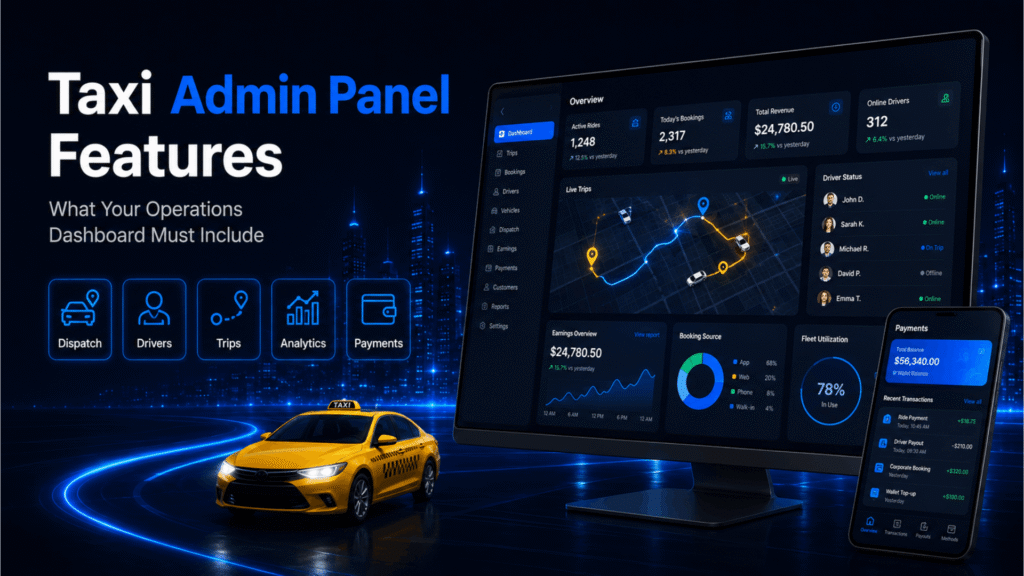
Why the Admin Panel Determines How Well You Can Run Your Taxi Business
The rider app is what your customers see. The driver app is what your fleet uses. But the admin panel is where your business is actually managed.
Every pricing decision, driver verification, payout cycle, cancellation policy, and operational adjustment runs through the admin panel. For taxi business owners and operations teams, it is the most used tool in the platform — and often the least discussed when businesses are evaluating their development options.
A taxi admin panel that is well designed gives operators real control: the ability to configure pricing without a developer, monitor active trips in real time, manage driver accounts centrally, and extract the data needed to make informed business decisions. A poorly designed admin panel forces operators to manage their business around the limitations of their software rather than the other way around.
This guide covers the essential taxi admin panel features, what each one does operationally, and why it matters for running a taxi business at any scale.
Taxi Admin Panel Feature Overview
The table below summarises the core features a taxi admin dashboard should include, along with its operational function and business impact.
| Feature | Operational Function | Business Impact |
|---|---|---|
| Driver Management | Approve, monitor, and manage the driver base | Fleet quality and compliance control |
| Rider Management | View, search, and manage rider accounts | Rider support and account oversight |
| Fare and Pricing Configuration | Set base fares, per-km rates, surge rules, and service pricing | Revenue and pricing flexibility |
| Booking and Trip Monitoring | Live and historical view of all bookings and trip statuses | Operational visibility and issue resolution |
| Commission and Payout Management | Configure driver commission and process settlements | Financial accuracy and driver trust |
| Zone and City Management | Define service areas, zones, and city-level operational settings | Multi-city scalability |
| Promotions and Referral Tools | Create and manage discount codes, referral programmes, credits | Rider acquisition and retention |
| Reporting and Analytics | Trip volume, revenue, driver performance, and demand data | Data-driven operational decisions |
| Corporate Account Management | Manage business accounts and their ride and billing settings | B2B revenue and enterprise adoption |
| Support and Dispute Management | Review and resolve rider and driver complaints | Service quality and churn reduction |
| Role-Based Access Control | Assign different admin access levels by team role | Operational security and team management |
| Notification and Alert Controls | Configure automated alerts for riders, drivers, and operations | Communication efficiency |
Taxi Admin Panel Features Explained
1. Driver Management
Driver management is one of the highest-activity areas of the admin panel. It gives the operations team a centralised view of every driver registered on the platform — their verification status, uploaded documents, vehicle details, active or inactive status, current rating, and trip history.
From this section, administrators can approve new driver applications, review and request resubmission of expired documents, suspend or deactivate driver accounts, and investigate performance issues. For platforms with fleet owner or aggregator models, driver management may also need to support multi-tier structures where drivers are linked to specific vehicle owners or operators.
Business relevance: centralised driver management reduces the time and manual effort required to maintain fleet quality and compliance. As the driver base grows, the ability to manage hundreds of accounts from a single interface — rather than individually — becomes operationally critical.
2. Rider Management
The rider management section provides a searchable directory of all registered riders, including their account details, booking history, wallet balance, ratings given, and any active promotions applied to their account. Administrators can search for a specific rider, view their activity, issue credits or adjustments, and suspend or deactivate accounts where necessary.
This section is also where support teams resolve rider queries — verifying a disputed trip, applying a manual fare adjustment, or reviewing the history behind a complaint.
Business relevance: rider management reduces the time needed to resolve support requests and gives the team the account visibility required to handle disputes accurately and professionally.
3. Fare and Pricing Configuration
Pricing configuration is one of the most important capabilities in the admin panel because it directly affects revenue, rider satisfaction, and competitive positioning. A well-designed fare management module allows administrators to set and adjust:
- Base fare per trip
- Per-kilometre and per-minute rates
- Minimum fare thresholds
- Surge pricing rules tied to demand levels or time windows
- Service-type pricing for different vehicle categories
- City-specific or zone-specific fare structures
- Cancellation fee rules
Critically, these adjustments should be possible without developer involvement. An admin panel that requires a code change every time the business needs to update its pricing is not operationally practical.
Business relevance: pricing flexibility is a competitive necessity. Markets shift, fuel costs change, and seasonal demand patterns require fare adjustments. Operators who can respond quickly have a meaningful advantage over those waiting on development cycles.
4. Booking and Trip Monitoring
The operations dashboard should give administrators a real-time view of all active trips — showing which drivers are on a job, where they are, which riders are waiting for pick-up, and what the current booking volume looks like across service zones.
Historical trip data should be searchable and filterable by date, driver, rider, zone, service type, status, and fare range. This view is used for operational oversight, post-trip analysis, and dispute investigation.
Business relevance: live booking visibility allows the operations team to identify and resolve service gaps before they escalate. Historical trip data supports revenue analysis, driver performance reviews, and pattern identification that informs strategic decisions.
5. Commission and Payout Management
Commission and payout management controls how earnings are split between the platform and drivers, and how settlements are processed. The admin panel should allow operators to:
- Set commission rates by driver tier, vehicle category, or service type
- View pending and completed payout records for each driver
- Process payouts manually or automate settlements on a defined schedule
- Review deductions for cancellations, penalties, or platform fees
- Export payout summaries for accounting and finance teams
For platforms operating in multiple markets, commission management may also need to handle currency differences, local tax requirements, and market-specific settlement rules.
Business relevance: accurate and transparent commission management reduces driver disputes, builds platform trust, and reduces the finance team’s manual reconciliation workload. Errors or opacity in payout processing are among the fastest ways to damage driver confidence and increase churn.
6. Zone and City Management
For operators running services across more than one city or geographic zone, the admin panel must support the configuration of separate operational environments. Each zone or city may have its own:
- Pricing and fare structure
- Service availability and vehicle types
- Surge pricing rules
- Operational hours
- Driver pools and assignment logic
Zone management allows a single platform instance to operate consistently across geographically distinct markets without requiring separate platform deployments for each location.
Business relevance: zone-level configuration is what makes multi-city or multi-country expansion operationally practical. Without it, scaling to a new market requires either a separate platform setup or accepting that the new market will use inappropriate pricing and settings from another location.
7. Promotions and Referral Tools
The promotions module allows the operations or marketing team to create and manage discount codes, referral programmes, first-ride offers, and rider credits — without requiring developer input for each campaign. Administrators should be able to set the discount value or type, the usage limit, the validity period, and the eligible user segments for each promotion.
A referral system within this module allows existing riders to share invite codes that credit both the referrer and the new rider, creating a low-cost acquisition loop that runs within the platform.
Business relevance: promotional tools are essential for rider acquisition in competitive markets and for re-engaging lapsed users. Without admin-level control over promotions, the marketing team is dependent on developers for every campaign — which slows execution and increases cost.
8. Reporting and Analytics
A strong reporting module is what separates a taxi platform that is managed reactively from one that is managed strategically. The admin panel should provide access to:
- Trip volume by day, week, month, and zone
- Revenue summary with breakdowns by service type and market
- Driver performance metrics including acceptance rate, completion rate, and average rating
- Rider activity data including booking frequency, churn indicators, and wallet usage
- Cancellation rate analysis by driver, zone, and time period
- Peak demand patterns to inform fleet positioning and incentive planning
- Exportable reports for finance, operations, and investor reporting
Business relevance: operational data is the foundation of every meaningful business decision — from adjusting pricing to planning fleet expansion. Taxi businesses that operate without reliable analytics are making decisions based on intuition rather than evidence, which increases risk as the platform scales.
9. Corporate Account Management
For taxi businesses serving corporate clients, the admin panel needs to support the creation and management of business accounts. This includes setting up invoiced billing cycles, managing which employees are authorised to book under the account, applying corporate-specific fare rules, and generating trip reports for expense management.
Corporate accounts represent a significant revenue opportunity for taxi businesses because they generate predictable, recurring trip volume from a single client relationship.
Business relevance: without corporate account management tools in the admin panel, serving business clients requires manual workarounds that do not scale. A structured corporate module enables B2B revenue without proportional increases in operational overhead.
10. Support and Dispute Management
The admin panel should include a structured system for managing rider and driver support requests, fare disputes, and service complaints. Support agents should be able to view the full context of a disputed trip — route, fare calculation, driver details, timestamps, and communication records — from a single screen, and take appropriate action such as issuing a fare adjustment, applying a credit, or escalating an investigation.
Business relevance: a structured dispute management workflow reduces resolution time, ensures consistent handling of complaints, and gives the team the information needed to make fair and accurate decisions. Poor dispute handling is one of the most damaging sources of negative reviews for taxi platforms.
11. Role-Based Access Control
Not every member of the operations team should have access to every function in the admin panel. Role-based access control allows administrators to assign different levels of access to different team members — for example, a finance team member who can view payouts but cannot modify driver accounts, or a support agent who can access trip history but cannot change pricing rules.
Business relevance: access control protects against accidental or unauthorised changes to critical platform settings, supports internal audit requirements, and allows the team to grow without creating security risks from overly broad system access.
12. Notification and Alert Controls
The admin panel should allow operators to configure automated notifications sent to riders and drivers at key moments — booking confirmation, driver arrival, trip completion, payout processed, document expiry reminder, and promotional announcements. Alert controls may also include internal operational notifications that flag unusual activity, such as a sudden spike in cancellations or a driver with rapidly declining ratings.
Business relevance: automated, well-timed notifications reduce manual communication workload, improve rider and driver experience at key moments, and give the operations team early warning of issues that need attention.
Admin Panel Capabilities: White-Label vs Custom Development
Both white-label taxi app solutions and custom development paths provide an admin panel. The key differences are in the depth of configurability and the ability to adapt the panel to specific operational models.
| White-Label Solution | Custom Development |
|---|---|
| Core admin features included and configured for standard operations | Admin panel designed around your specific operational workflows |
| Pricing configuration within platform’s supported fare models | Pricing logic built to match any fare structure you require |
| Reporting based on platform’s standard data model | Custom reporting tailored to your KPIs and business model |
| Commission structure configurable within platform parameters | Commission and settlement logic built to your exact specifications |
| Role access levels based on vendor’s access model | Role-based access designed around your team structure |
| Feature additions follow vendor product roadmap | Admin functionality extended whenever the business requires it |
| Best fit for standard fleet operations | Better for complex multi-tier, multi-market, or enterprise operations |
For most taxi businesses launching or scaling within standard operational models, a white-label admin panel covers the essential management capabilities. Custom development becomes relevant when operational complexity, multi-market structures, or specific reporting and integration requirements exceed what a configurable platform can support.
Build an Admin Panel That Gives You Real Operational Control
The taxi admin panel is not just a back-end interface — it is where your business decisions happen. The quality of your admin dashboard determines how efficiently you can manage your fleet, how quickly you can respond to market changes, and how confidently you can scale.
Whether you are evaluating a white-label taxi app solution or planning a custom taxi app development, the admin panel deserves the same level of scrutiny as the rider and driver apps. The features described in this guide are not extras — they are the operational foundations that allow a taxi business to grow from launch to scale.
How We Help You Build an Admin Panel That Matches Your Operations
Since 2012, we have designed and delivered admin panels for taxi and mobility businesses across 95+ countries. We understand that the admin panel is not a secondary feature — it is the control layer that determines how efficiently a taxi business can operate at scale.
Our approach to admin panel development starts with understanding your operational model: how your fleet is structured, how pricing works in your market, how payouts are managed, and what data your team needs to make decisions. With our proven taxi app development expertise, we have seen the operational problems that arise from admin panels that were built for demos rather than day-to-day management — and we build to avoid them.
Frequently Asked Questions
To see the admin panel in action, request a free admin panel demo.
A taxi admin panel is the web-based management interface used by taxi business owners and operations teams to control the platform. It provides tools for managing drivers, configuring pricing, monitoring bookings, processing payouts, running promotions, and accessing operational analytics. It is the central control layer of the taxi platform — separate from the rider app and driver app, but connected to both in real time.
A taxi admin dashboard should include driver and rider management, fare and pricing configuration, live booking and trip monitoring, commission and payout management, zone and city management, promotional tools, reporting and analytics, corporate account management, dispute resolution tools, role-based access control, and notification management. Together these features give the operations team the control and visibility needed to run a taxi business effectively.
Fare configuration in the admin panel allows operators to adjust pricing in response to market conditions, competitive pressure, or operational cost changes — without requiring developer involvement. The ability to change base fares, per-kilometre rates, surge rules, and service-type pricing directly from the admin panel is an operational necessity for any taxi business that needs to stay commercially responsive.
A well-designed admin panel supports multi-city operations through zone and city management tools that allow separate pricing structures, service availability settings, and operational configurations for each geographic market. This means a single platform instance can manage multiple cities or countries without requiring separate deployments, while still giving the operations team city-level control over each market.
A white-label taxi admin panel includes a standard set of management features that can be configured for your brand and operational requirements. A custom admin panel is built from scratch to match your specific workflows, commission models, reporting needs, and team structure. For most standard taxi operations, a white-label panel provides sufficient control. custom development is more appropriate for businesses with unique operational models, complex multi-market structures, or requirements that a configurable platform cannot accommodate.
Operational analytics in the admin panel give taxi businesses the data they need to make informed decisions about pricing, fleet size, zone expansion, driver incentives, and rider retention. Without reliable reporting, business decisions are based on intuition rather than evidence. As the platform scales, the ability to identify demand patterns, monitor driver performance, and track revenue by market becomes increasingly important for competitive positioning and sustainable growth.